Employees are already making decisions about how to use AI at work, often without clear guidance on what's safe or appropriate.
When that guidance is missing, some employees avoid using AI because they're unsure what's allowed. Others find workarounds that introduce unnecessary risks. Neither helps organizations get the value they're looking for from AI.
Clear AI usage guidelines help employees navigate those decisions. The most useful guidelines are developed with the people doing the work, not just written for them. Legal and Security teams have an important role in establishing boundaries, but employees also need guidance they can apply to the situations they encounter every day.
In this article, we'll walk through the difference between guidelines and policies (and why that matters) and the nine components to include in your organization's AI usage guidelines, with practical direction on what each should cover. We've also included a prompt you can use to create a first draft or improve your existing guidelines.
AI Policies and Guidelines: The difference and why you need both
An AI policy can establish the boundaries for responsible use, but employees also need help applying those rules to their work. Knowing which tools are approved doesn't necessarily tell someone whether they can use AI with a particular client document or how to check the output before sharing it.
That's the role of practical AI usage guidelines. Whether they're part of a formal policy or a separate resource, they should help employees make informed decisions about using AI safely and effectively.
While policies and guidelines can be combined into one document, they serve different purposes. Here's how those differences typically play out.
The following nine components provide a starting structure for your organization's AI usage guidelines. Each one addresses something employees need to understand to use AI responsibly and effectively, and you can adapt the sections to fit your organization's work.
1. The case for AI transformation now
Explain why your organization is investing in AI now, what you hope to achieve, and why this matters to employees. Go beyond the general pressure to keep up with AI and make the case for your organization's specific needs and priorities.
Ground the case in your organization’s goals and current work. Connect AI to challenges employees recognize, such as repetitive tasks, slow handoffs, or work that could benefit from better access to information. This helps employees understand why AI is a priority and how they can contribute to the organization's goals.
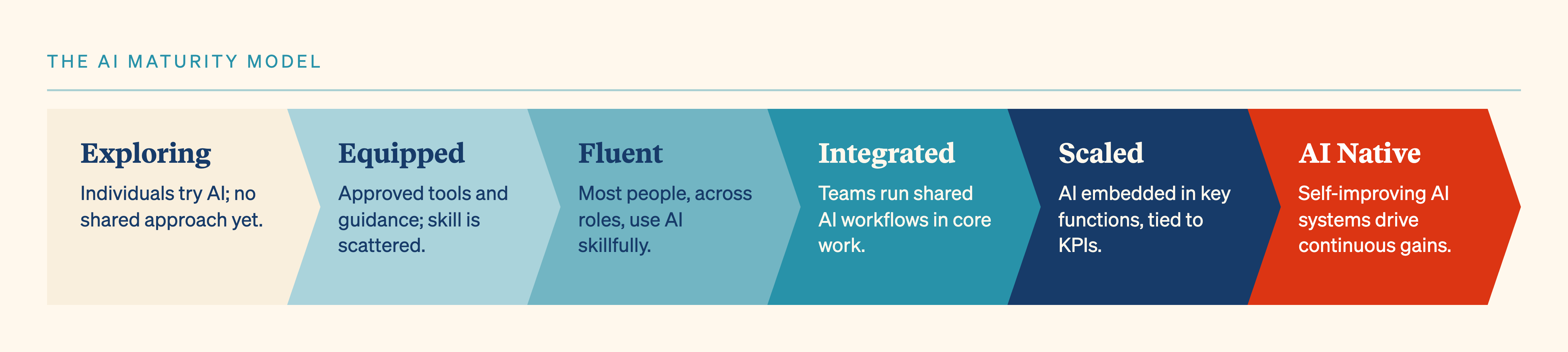
2. Where we are on the AI Maturity Spectrum
The AI Maturity Spectrum describes how an organization's use of AI develops, from early experimentation and individual productivity gains to shared workflows and systems that change how teams work.
Use this framework to explain where your organization stands today and what you want to achieve over the next year. Employees should understand what progress looks like and how their work contributes to it.
Make the next goal specific enough to guide action. For example, an organization where employees already use AI regularly might focus on identifying opportunities to improve shared workflows. Revisit that goal as teams develop new capabilities.
3. Our stance on AI use
State whether AI use is optional, encouraged, expected, or required for particular tasks. Employees shouldn't have to guess what their organization expects of them.
Set expectations by role or type of work rather than applying one blanket rule. Identify tasks where employees should consider AI, where they may choose whether to use it, and where human judgment or approval is required. Make it clear that employees remain responsible for their decisions and final outputs, even when AI supports the work.
Establish clear expectations for reviewing AI-generated work based on the risks involved. Low-stakes tasks may only need a quick review, while work involving sensitive information, important decisions, or external audiences may require independent verification against reliable sources or formal approval.
4. Approved tools and their purposes
List the AI tools your organization has approved and explain what employees can use each one for. Be specific about which tools are appropriate for different types of work, including any restrictions on the information employees can share with them.
Clarify the difference between company-managed and personal accounts, since the same tool may have different security protections depending on how it's accessed. Explain how employees can request access to additional tools or get approval to experiment with something new.
Keep this list updated as tools and organizational needs change.
5. Team-specific data rules
Give teams concrete examples of what they can and cannot enter into approved AI tools. A single organization-wide rule may be too vague to help employees make decisions about customer information, employee records, financial data, source code, or other sensitive material.
Work with each function to identify the information it handles and establish clear rules for using it with AI. A shared classification system, such as green, amber, and red, can help employees understand which information is safe to use, which requires additional precautions, and which is prohibited. Make sure the categories are clearly defined and include examples relevant to each team's work.
Clarify whether restrictions differ by tool or account type, and give employees a clear way to get answers when they're unsure what information they can share.
For example, an HR team might be permitted to use approved AI tools to draft job descriptions but face additional restrictions when working with candidate information or employee records. Examples like these help employees understand how data rules apply to the materials they work with every day.
6. When and where to disclose AI use
Clarify when employees are required to disclose AI assistance, who needs to know, and what information they should share. Requirements may differ for external communications, customer deliverables, internal documents, or records that need to show how work was produced.
Make disclosure expectations easy to follow. Explain when a short statement is sufficient, when employees need to describe how AI contributed to the work, and whether any approvals are required. Address specific situations such as AI meeting note-takers and recordings, including consent requirements. Include sample language employees can adapt to common situations.
Beyond formal requirements, establish clear expectations for transparency within teams. Employees should understand when sharing their AI use is necessary and when it's optional. Encouraging people to share effective approaches can also help colleagues learn from one another.
7. Safe AI experimentation
Shadow AI happens when employees use AI tools that haven't been approved by their organization, or use approved tools in ways that aren't permitted. Both can introduce security and data privacy risks.
Employees are more likely to find workarounds when restrictions prevent them from doing useful work. Rather than relying on prohibitions alone, give employees a clear way to raise these obstacles and work with IT or Security to find safe alternatives.
Establish clear boundaries for experimentation, including which tools or environments employees can use, what data they can work with, and when approval is required. Allocate a dedicated experimentation budget so employees have the resources to explore new tools and identify opportunities to improve their work.
Give employees a straightforward path from idea to experiment: where to submit a proposal, who reviews it, and what information is needed. Make the approval process quick and transparent, and clarify what must happen before an experiment can be expanded to other teams or higher-risk work
8. The process for tracking AI use case wins and missed opportunities
Give employees a clear way to share successful uses of AI, report problems, and flag opportunities they haven't been able to pursue. This might include inaccurate outputs, unexpected behavior, data concerns, or workflows that could benefit from AI but face technical or organizational barriers.
Explain where employees should submit these examples, who reviews them, and what happens next. Successful approaches might be shared across teams or developed into repeatable workflows, while reported problems could lead to additional safeguards, training, or changes to the guidelines.
Track outcomes that help your organization understand where AI is creating value and where employees need more support, rather than focusing solely on how many people are using it.
9. Assign guidelines ownership and accountability
Assign a clear owner to your AI usage guidelines and identify the people responsible for maintaining them. Clarify who approves tools and exceptions, who sets data rules, who reviews risks, and who maintains team-specific guidance. Give employees a clear point of contact for questions or concerns.
Set a regular review cadence and identify what should trigger an update, such as new tools, changes in regulations, or feedback from employees. Include a version number and review date so employees can easily identify the latest guidance.
Involve representatives from across the organization in developing and updating the guidelines, particularly the employees who will use them. Clear ownership and input from the people doing the work help ensure the guidelines remain relevant and practical.
Apply this to your organization: Copy-and-paste AI prompt
If your organization does not yet have AI usage guidelines, use the prompt below to build a first draft around the nine components in this article. It will guide you through the information that makes the guidance specific to your organization, then organize it into a draft for review by Legal, Compliance, Security, and the teams who will use it.